Run parallel Claude Code agents on different accounts and models
Your job just split into five tasks. Subagents would run all five out of sight, on one account.
Updated
Run them as separate Claude Code sessions instead, and start them with clausona run. That puts a session on the profile you name: your work account, a second subscription, or an API model such as DeepSeek.
Any terminal works, and so does a runner that gives you a terminal or lets you set the command.
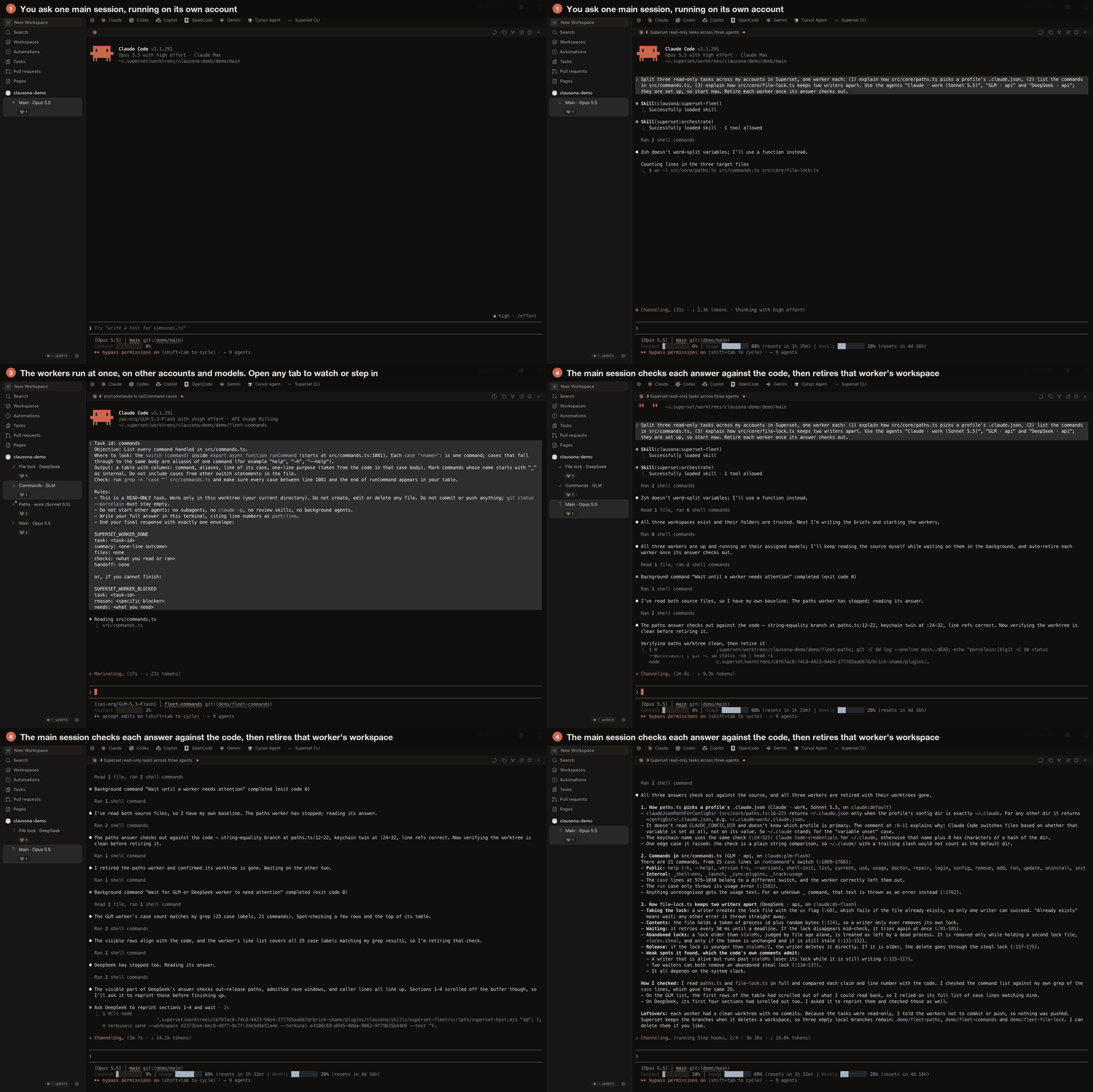
To have one session coordinate them, add the fleet plugin for your runner: superset-fleet, herdr-fleet or orca-fleet. One Claude Code or Codex session plans the work and starts a worker per task on the profile your rules pick. It watches and answers the workers, then checks their results before it cleans up. Install the one you need:
claude plugin marketplace add larcane97/clausona
claude plugin install superset-fleet@clausona   # or herdr-fleet, orca-fleet
In Codex, use codex plugin marketplace add and codex plugin add the same way, and add fleet-core@clausona too.
Then ask: "Split these across my accounts in Superset: add a --json flag to notes list, write tests for src/parse.ts, and fix the broken links in docs/."
- Where subagents fall short
- Subagents or separate sessions
- Use clausona with whatever runs your agents
- How the Superset fleet works
- Route agents to accounts and models
- Add an API model such as DeepSeek
- Set up the Superset fleet
- Limits of the fleet
- Questions
Where subagents fall short
Subagents are fine for quick errands inside one session. For five real tasks at once, three things get in the way:
- A subagent runs inside its parent session. You see what it returns, not what it's doing, so a wrong turn shows up only at the end.
- You can't type into a single subagent to correct it or answer it. Stopping one usually means interrupting the session that runs all of them.
- Subagents run on the account of the session that started them. Five at once use up that account's 5-hour window five times as fast. None of them can run on another account, or on a model from another provider.
Separate sessions don't have these problems. You can read along or answer a question, and you can stop one agent without touching the others.
Subagents or separate sessions
| Claude Code subagents | Separate sessions with clausona | |
|---|---|---|
| Each agent visible as its own session | No, inside the parent | Yes, a terminal, pane or tab each |
| Type into one agent | No | Yes |
| A different account per agent | No, all on the parent's account | Yes, a clausona profile each |
| An API model such as DeepSeek per agent | No, Claude models on the same account | Yes, an API profile |
| Routing by your rules and each account's usage | No | Yeswith a route or a fleet plugin |
| Result checked before cleanup | No | Yes, branch, diff and checkswith a fleet plugin |
Compared from the projects' documentation in October 2026. Corrections are welcome on GitHub.
Use clausona with whatever runs your agents
herdr, Orca and Superset run your agents and show them to you. clausona puts each one on the account or model you name.
They work together.
In any terminal, clausona run claude:work starts a Claude Code session on that account. In tmux, open it in a new window:
tmux new-window 'clausona run claude:work'herdr is a terminal runtime that keeps agent panes running and shows their state. Open a pane and run clausona run claude:work in it. The herdr-fleet plugin adds a coordinator there: see parallel agents in herdr.
Orca is an open-source desktop app that runs coding agents side by side in separate git worktrees. It works with any CLI agent. In an Orca terminal, clausona run claude:work starts Claude Code on that account.
Orca also has its own Claude and Codex account switcher. The orca-fleet plugin adds a coordinator there: see parallel agents in Orca.
In Superset, add a custom agent whose command is the full path that command -v clausona prints. Its arguments start with run claude:work --, and the setup steps have the full line.
In Superset, the superset-fleet plugin adds the coordinator. The next section shows how it works there.
How the Superset fleet works
In Superset, a worker is an ordinary Claude Code or Codex session with its own tab and git worktree.
You talk to one Claude Code or Codex session in Superset, the orchestrator. With the superset-fleet skill, it:
- Picks a profile per task from your request, your rules and the profiles' current usage. Then it shows you the plan.
- Starts the workers, one Superset workspace per task. A workspace is named after its task and profile, so the sidebar shows which account runs where.
- Watches them. It answers their questions and tells you when one waits at a permission prompt. If an account reaches its limit, it hands the task to another allowed profile.
- Checks the results itself: the commits, the diff and the checks the brief named. It reports what it verified apart from what the worker only claimed.
- Retires finished workers, after asking you by default. A worker is retired only when its branch is pushed and its worktree is clean. The branch stays.
An example plan it might show before starting:
| Task | Profile | Why there |
|---|---|---|
--json flag for notes list | claude:workOpus 5.5 | touches the CLI's core; your rule sends it here |
Tests for src/parse.ts | claude:deepseekdeepseek-v4-pro | small, explicit brief with a check command |
Broken links in docs/ | claude:sideSonnet 5.5 | most headroom of the subscription profiles |
Route agents to accounts and models
The orchestrator decides which account or model a worker runs on. It follows what you say in the conversation first, then ~/.clausona/fleet.json, then its defaults. The Superset, herdr and Orca plugins share that file.
{
  "workers": ["claude:work", "claude:side", "claude:deepseek"],
  "routing": [
    "claude:deepseek takes tests and doc fixes, never changes under src/",
    "anything touching the release process goes to claude:work"
  ],
  "maxUsage": 80,
  "retire": "ask"
}workerslists the only profiles that may be workers.routingholds your own rules, in plain words. The orchestrator applies them when it fills in the plan.maxUsageskips a subscription profile once its 5-hour or weekly usage reaches that percentage. The default is 90.retireisask(the default) orauto.permissionssets how workers run, per tool, such as{"claude": "acceptEdits", "codex": "on-request"}. In Codex's default sandbox a Codex worker asks before each commit and push. Add"codexSandbox": "danger-full-access"to it if you want Codex workers to do that on their own. That turns Codex's sandbox off for workers.
Whatever your rules leave open, the defaults decide:
- The orchestrator's profile never takes a worker.
- Workers use the orchestrator's tool. Codex profiles join a Claude Code fleet, or the other way round, only when you name them or list them in
workers. - Profiles with more headroom are preferred, and workers are spread across them.
- Wide mechanical work goes to API profiles.
- An independent check of risky work runs on a third profile.
You can also change the file by asking, for example "never use claude:personal for workers".
Add an API model such as DeepSeek
Any endpoint that speaks the Anthropic Messages format can be a profile. DeepSeek serves one at https://api.deepseek.com/anthropic:
clausona add claude:deepseek --api \
  --base-url https://api.deepseek.com/anthropic \
  --model deepseek-v4-pro
clausona asks for the key without echoing it. It keeps the key in the macOS Keychain or in ~/.clausona/secrets.json.
The profile shares your setup like any account. OpenRouter, a gateway or a model you serve yourself work the same way.
API workers need a little more care:
- Give them small, explicit briefs that name the file, the function, the change and the command that checks it. Long exploratory briefs overflow smaller context windows.
- Give them a short tool list, such as
--tools=Bash,Read,Edit,Write,Grep,Glob. That keeps tool definitions out of the context. - Check whether the endpoint honors prompt caching. Without it, every turn re-reads the whole conversation, and long sessions slow down.
Set up the Superset fleet
-
Install clausona and add a profile per account or API endpoint.
clausona add claude:work clausona add claude:side -
In Superset, open Settings, then Agents. Add a custom agent per profile. Set its command to the output of
command -v clausona. For the arguments, use something like this:run claude:work -- --model claude-sonnet-5-5 --effort high --permission-mode acceptEdits --strict-mcp-configPut the model and effort here, because Superset doesn't pass them to custom agents.
--strict-mcp-configkeeps a worker from stopping at Claude Code's "new MCP servers found" question.If the Superset CLI isn't logged in, the skill can add these agents for you, after asking.
-
Start every new profile once by hand. That answers its one-time questions before a worker meets them.
clausona run claude:deepseek -
Install the plugin. Plugins are shared across profiles, so one install reaches all of them.
claude plugin marketplace add larcane97/clausona
claude plugin install superset-fleet@clausona
Limits of the fleet
- Superset has to run on the same machine. The desktop app and
superset startboth work. - If the Superset CLI isn't logged in, the skill talks to the Superset app's local host service through a bundled helper. That service isn't a documented API. The helper says so and stops if an update changes it.
Questions
Does the orchestrator run workers on its own account?
No. The orchestrator's profile only coordinates, and workers go to other profiles.
Can retiring a worker lose work?
A worker is retired only when its work was checked, its branch is pushed and its worktree is clean. In Superset, right before it deletes the workspace, the plugin's helper checks the branch and the worktree again, and refuses if either isn't clean. herdr and Orca refuse to remove a worktree with uncommitted changes themselves.
Do I need Superset to give agents different accounts?
No. clausona run claude:work starts a Claude Code session on that account in any runner: a plain terminal, tmux, herdr, Orca or Superset. The fleet plugins for Superset, herdr and Orca add a coordinator on top. It plans and routes the work. Then it watches the workers and checks their results.
What happens when an account reaches its limit mid-task?
The orchestrator hands the task to another profile your rules allow, in the same workspace. It also closes the stopped worker's terminal.
Start with your accounts
clausona and the plugins are free and open source. Set up your accounts first, then add the plugin.
The full reference is in the use case on GitHub, where a star helps other people find it.