Run parallel Claude Code and Codex agents in Orca, each on its own account
Orca gives every agent its own worktree and tab. With clausona, each of those agents can also run on its own account, or on a model like DeepSeek.
Updated
Install the orca-fleet plugin. It brings fleet-core, the rules all the fleet plugins share, with it:
claude plugin marketplace add larcane97/clausona
claude plugin install orca-fleet@clausona
Then, in an Orca terminal, ask Claude Code something like "Split these across my accounts in Orca: write a CODE_OF_CONDUCT.md with Sonnet on claude:side, and add a .prettierrc on DeepSeek."
It plans the work and starts a worker per task in its own Orca worktree, on the account each one should use. It checks what comes back before it cleans up.
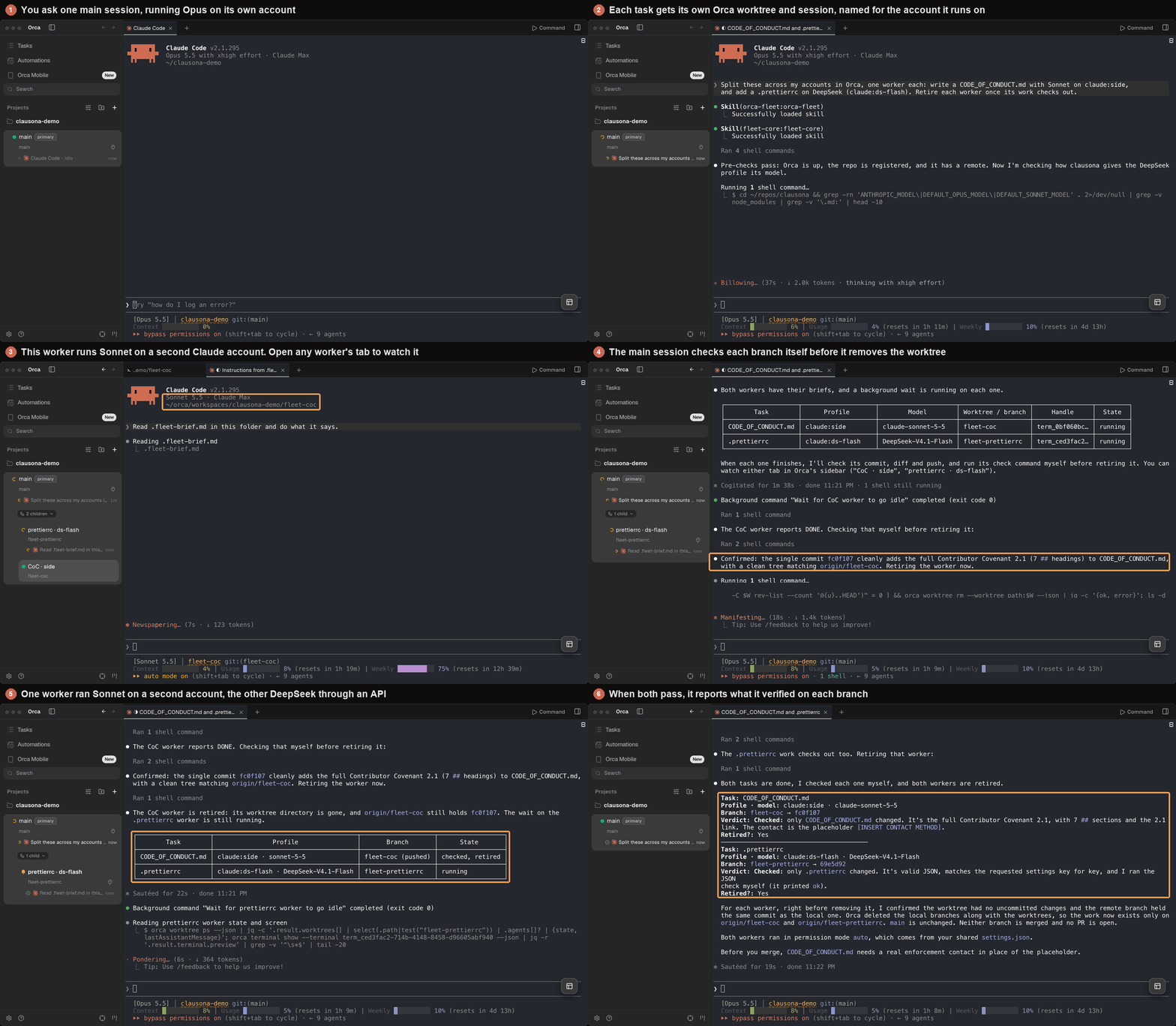
What you see in Orca
Each worker shows up in Orca's sidebar as a worktree. Its name says what the worker is doing and which clausona profile it runs on, so you can tell the accounts apart at a glance.
For Claude Code workers, Orca's sidebar also shows whether they're working or done, and orca worktree ps gives their last reply. Orca's hooks live in the Claude Code settings that clausona shares, so that works on every profile.
You can open any worker's tab and type into it. If one heads the wrong way, you stop that one and leave the rest alone.
How a run goes
The main session reads your profiles with clausona list and picks one per task. If neither your request nor fleet.json names the accounts, it shows you the plan and waits for your OK.
Then it creates a worktree per task with orca worktree create, opens a terminal there, and sends clausona run for the chosen profile once the shell is ready.
Orca has its own account switcher, and it sets CODEX_HOME in its terminals. clausona run overrides that for the worker it starts, so each tab runs on the account the plan chose.
The brief goes into a file in the worktree, and the worker gets one line telling it to read that file. Orca's terminal wait then tells the main session when the worker's screen goes quiet.
When a worker says it's done, the main session checks for itself: the commits, the diff, and a clean, pushed branch. Then it removes the worktree with orca worktree rm, after you approve (the default) or right away if retire is auto. Orca refuses one with uncommitted changes, and it also deletes the local branch, which is why the push check comes first.
Orca keeps worktrees under ~/orca/workspaces. If you have a ~/.mcp.json in your home folder, Claude Code would ask about "new MCP servers" there, so Claude Code workers start with --strict-mcp-config.
Codex as the main session
Codex can coordinate too. Install the plugins in Codex. There are no plugin dependencies there, so add fleet-core yourself:
codex plugin marketplace add larcane97/clausona
codex plugin add fleet-core@clausona
codex plugin add orca-fleet@clausona
A Codex fleet uses Codex accounts by default, and a Claude Code fleet uses Claude Code accounts. The other tool's profiles only join when you name them or list them in workers.
Codex workers don't show their state in Orca's sidebar, because Orca's Codex hooks live in Orca's own Codex folder. The main session reads their screens instead.
In Codex's default sandbox, a Codex worker can't write to .git or reach the network. So it asks before it commits and again before it pushes, and you approve those in its tab. If you'd rather it did that on its own, add "codexSandbox": "danger-full-access" to permissions in the settings file below. That turns Codex's sandbox off for workers.
Settings
The fleet plugins share one file, ~/.clausona/fleet.json. It can list the profiles that may be workers, your routing rules in plain words, a usage limit, and whether finished workers are removed automatically. The agent fleets guide explains each key.
You can also just say it, for example "always remove finished workers", and the main session updates the file.
Questions
Does Orca need to be open?
Yes. The orca command talks to the running app, so keep Orca open on the same machine. The main session can run in an Orca terminal or anywhere else on that machine.
Does it work on Windows and Linux?
Yes. Orca and clausona both run on macOS, Windows and Linux, and the plugin drives Orca with the same orca commands on all three. On Windows, a Codex main session runs its commands in PowerShell, and the plugin gives it the PowerShell forms.
Can removing a worker lose work?
Orca deletes the worktree and its local branch, so the main session removes a worker only after its branch is pushed and its worktree is clean. orca worktree rm refuses a worktree with uncommitted changes, and the main session never forces it.
Do I need the plugin to give Orca tabs different accounts?
No. clausona run claude:work in any Orca terminal runs that tab on that account. The plugin adds a coordinator that plans the work and checks it.
Start with your accounts
clausona and the plugins are free and open source. Set up your accounts first, then add the plugin.
The reference page is on GitHub, where a star helps other people find it.