Run parallel Claude Code and Codex agents in herdr, each on its own account
herdr already keeps your agents in panes you can watch. With clausona, each of those panes can run on a different account, or on a model like DeepSeek.
Updated
Install the herdr-fleet plugin. It brings fleet-core, the rules all the fleet plugins share, with it:
claude plugin marketplace add larcane97/clausona
claude plugin install herdr-fleet@clausona
Then, in a herdr pane, ask Claude Code something like "Split these across my accounts in herdr: write a CONTRIBUTING.md with Sonnet on claude:side, and add an .editorconfig on DeepSeek."
It plans the work and starts a worker pane per task, on the account each one should use. It checks what comes back before it cleans up.
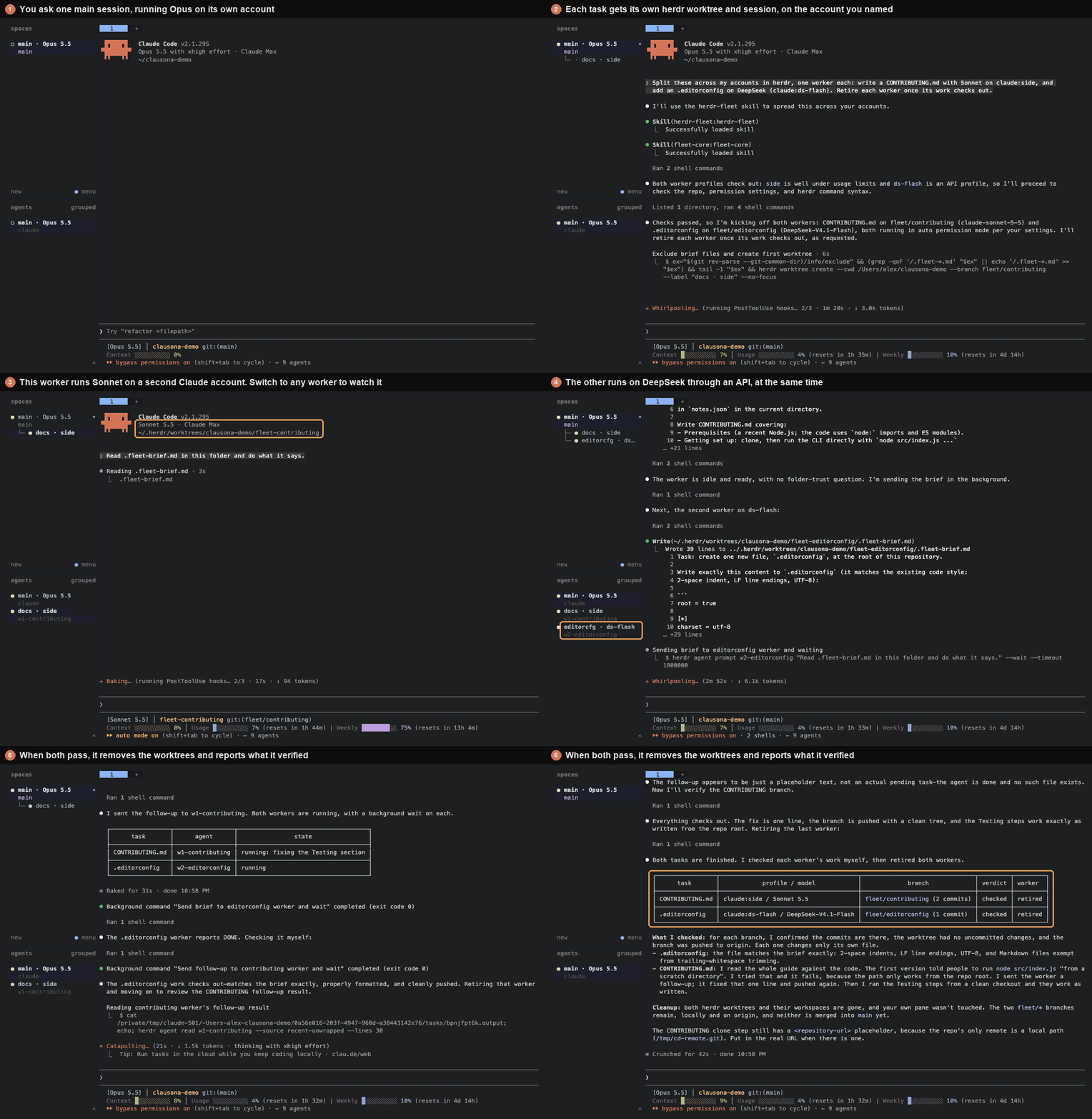
What you see in herdr
Each worker gets its own git worktree and a workspace in herdr's sidebar. The label says what the worker is doing and which clausona profile it runs on, so you can tell the accounts apart at a glance.
herdr's agents list shows every worker as working, idle, blocked or done. It reads that from the pane itself, so it works for Claude Code and Codex alike.
You can switch to any worker's pane and type into it. If one heads the wrong way, you stop that one and leave the rest alone.
How a run goes
The main session reads your profiles with clausona list and picks one per task. If neither your request nor fleet.json names the accounts, it shows you the plan and waits for your OK.
Then it creates a worktree per task with herdr worktree create and starts clausona run for the chosen profile in that pane.
The brief goes into a file in the worktree. The worker just gets one line telling it to read that file, so nothing long has to be pasted into a terminal.
The main session waits with herdr agent prompt --wait. That only returns once the worker has actually started and then stopped, which means the main session isn't woken by a worker that hasn't picked up its brief yet.
When a worker says it's done, the main session checks for itself. It looks at the commits, the diff and a clean, pushed branch. Then it removes the worktree with herdr worktree remove, after you approve (the default) or right away if retire is auto. herdr refuses to remove one with uncommitted changes, and the branch stays.
The first time a profile meets your repo, Claude Code or Codex asks whether to trust the folder. herdr shows that as blocked. The main session reads the screen and answers it for the repo you asked it to work on, and for nothing else.
Codex as the main session
Codex can coordinate too. Install the plugins in Codex. There are no plugin dependencies there, so add fleet-core yourself:
codex plugin marketplace add larcane97/clausona
codex plugin add fleet-core@clausona
codex plugin add herdr-fleet@clausona
A Codex fleet uses Codex accounts by default, and a Claude Code fleet uses Claude Code accounts. The other tool's profiles only join when you name them or list them in workers.
Codex workers start with --disable hooks, so they don't stop at Codex's "Hooks need review" screen. Whether to trust hooks stays your decision.
In Codex's default sandbox, a Codex worker can't write to .git or reach the network. So it asks before it commits and again before it pushes, and you approve those in its pane. If you'd rather it did that on its own, add "codexSandbox": "danger-full-access" to permissions in the settings file below. That turns Codex's sandbox off for workers.
One more Codex setting matters here. If your Codex config has inherit = "core" under [shell_environment_policy], Codex hides herdr's variables from the commands it runs. Start the main session with -c shell_environment_policy.inherit=all and it can reach herdr again.
Settings
The fleet plugins share one file, ~/.clausona/fleet.json. It can list the profiles that may be workers, your routing rules in plain words, a usage limit, and whether finished workers are removed automatically. The agent fleets guide explains each key.
You can also just say it, for example "never use claude:personal for workers", and the main session updates the file.
Questions
Does the main session have to run inside herdr?
Yes. herdr's commands talk to the session of the pane they run in, so start Claude Code or Codex in a herdr pane and ask from there.
Does it work on Windows and Linux?
Yes. herdr and clausona both run on macOS, Linux and Windows, and the plugin drives herdr with the same commands on all three. On Windows, a Codex main session runs its commands in PowerShell, and the plugin gives it the PowerShell forms.
Can removing a worker lose work?
Only uncommitted changes could, and herdr worktree remove refuses a worktree that has them. The main session never forces it, and it checks that the branch is pushed first.
Do I need the plugin to give herdr panes different accounts?
No. clausona run claude:work in any pane runs that pane on that account. The plugin adds a coordinator that plans the work and checks it.
Start with your accounts
clausona and the plugins are free and open source. Set up your accounts first, then add the plugin.
The reference page is on GitHub, where a star helps other people find it.