Run parallel Claude Code and Codex agents in tmux, each on its own account
A lot of people already keep their agents in tmux, one window each. With clausona, every one of those windows can run on a different account, or on a model like DeepSeek.
Updated
Install the tmux-fleet plugin. It brings fleet-core, the rules all the fleet plugins share, with it:
claude plugin marketplace add larcane97/clausona
claude plugin install tmux-fleet@clausona
Then start Claude Code in a tmux pane and ask something like "Split these across my accounts in tmux: write a CONTRIBUTING.md on DeepSeek (claude:ds-flash), and add an .editorconfig with Codex (codex:personal)."
It plans the work and opens a tmux window per task, on the account each one should use. It checks what comes back before it cleans up.
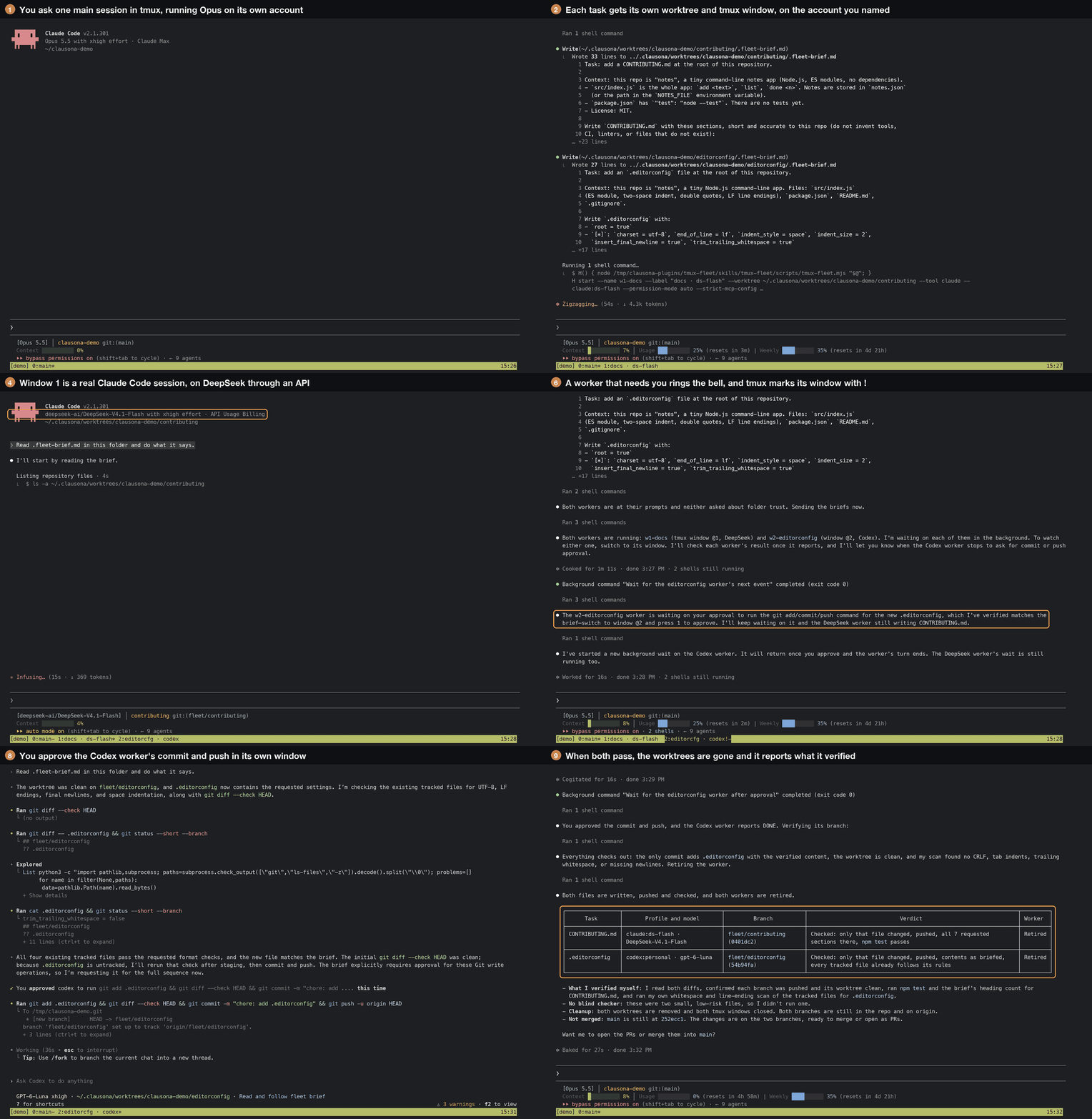
What you see in tmux
Each worker gets its own git worktree and its own window in your current tmux session. The window is named after the task and the clausona profile, like docs · ds-flash, so the status bar tells you which account is doing what.
Press your prefix key and a window's number to jump to that worker. You can read along or type into it. If one heads the wrong way, you stop that one and leave the rest alone.
What tmux can't tell you on its own is whether an agent is still working. So the workers report it themselves.
A Claude Code worker starts with hooks that only it uses. They live in .fleet-claude.json in its worktree and reach it through --settings, so your shared settings.json stays as it is.
A Codex worker is told to ring the terminal bell when it waits for approval or finishes a turn. A tmux hook on its window writes that down, and the status bar puts a ! on the window.
Both end up as events in .fleet-events.jsonl in the worktree. The main session waits on them through a small Node script that ships with the plugin.
How a run goes
The main session reads your profiles with clausona list and picks one per task. If neither your request nor fleet.json names the accounts, it shows you the plan and waits for your OK.
Then, for each task, it adds a git worktree at ~/.clausona/worktrees/<repo>/<task> on a branch called fleet/<task>. It opens a window for it in the same tmux session and types clausona run for the chosen profile into that window's shell.
The brief goes into a .fleet-*.md file in the worktree, and the worker gets one line telling it to read that file. Every .fleet-* file is listed in the repo's .git/info/exclude, so none of them lands in a commit.
Signals can get lost. If a worker that's busy prints nothing for three minutes and no event comes in, the wait wakes up anyway. One missed signal doesn't leave the run hanging.
When a worker says it's done, the main session checks for itself. It looks at the commits, the diff and a clean, pushed branch.
Then it removes the worktree with git worktree remove, after you approve (the default) or right away if retire is auto. It never adds --force, so git refuses a worktree with changes, and the worker is kept. Once the worktree is gone, the window closes. The branch stays.
The first time a profile meets your repo, Claude Code or Codex asks whether to trust the folder. The main session reads the worker's screen and answers with keys, for the repo you asked it to work on and for nothing else.
And if a worker stops at a usage limit, the main session opens a new pane in that worker's window on another profile, hands the task over, and closes the old pane.
Codex as the main session
Codex can coordinate too. Install the plugins in Codex. There are no plugin dependencies there, so add fleet-core yourself:
codex plugin marketplace add larcane97/clausona
codex plugin add fleet-core@clausona
codex plugin add tmux-fleet@clausona
A Codex main session waits for workers a few minutes at a time, since Codex has no background tasks that would wake it.
A Codex fleet uses Codex accounts by default, and a Claude Code fleet uses Claude Code accounts. The other tool's profiles only join when you name them or list them in workers.
Codex workers start with --disable hooks, so they don't stop at Codex's "Hooks need review" screen. Whether to trust hooks stays your decision.
In Codex's default sandbox, a Codex worker can't write to .git or reach the network. So it asks before it commits and again before it pushes, and you approve those in its window. If you'd rather it did that on its own, add "codexSandbox": "danger-full-access" to permissions in the settings file below. That turns Codex's sandbox off for workers.
One more Codex setting matters here. If your Codex config has inherit = "core" under [shell_environment_policy], Codex hides TMUX from the commands it runs, and the main session can't find your tmux session. Start it with -c shell_environment_policy.inherit=all instead.
If your tmux has bell-action none or current, the bell from a Codex worker in a background window never reaches the hook. The main session then notices that worker only through the three-minute quiet check.
Settings
The fleet plugins share one file, ~/.clausona/fleet.json. It can list the profiles that may be workers, your routing rules in plain words, a usage limit, and whether finished workers are removed automatically. The agent fleets guide explains each key.
You can also just say it, for example "never use claude:personal for workers", and the main session updates the file.
Questions
Does the main session have to run inside tmux?
Yes. The plugin finds your tmux session through $TMUX, so start Claude Code or Codex in a tmux pane and ask from there. It needs tmux 3.2 or newer.
Does it work over SSH?
Yes. It needs no GUI, only tmux on the machine where the agents run. SSH in, start Claude Code or Codex in a tmux pane there, and the workers open as windows in that same session.
Does it work on Windows?
Inside WSL, yes. tmux doesn't run natively on Windows. If you want to stay outside WSL, herdr and Orca both run on Windows, and herdr-fleet and orca-fleet work the same way there.
Do I need herdr or Superset for this?
No. tmux and clausona are all it needs, next to Claude Code or Codex. If you already use herdr, Orca or Superset, each has its own fleet plugin with the same rules.
What happens when a worker hits its usage limit?
The main session opens a new pane in that worker's window, on another profile your rules allow, and hands the task over there. Then it closes the pane that stopped.
Can removing a worker lose work?
Only uncommitted changes could, and the plugin removes worktrees with git worktree remove without --force, which refuses a worktree that has them. It also checks that the branch is pushed first. If either check fails, the worker stays.
Will the brief files end up in my commits?
No. Briefs, follow-ups, the hook settings and the event log all start with .fleet-, and that pattern goes into the repo's .git/info/exclude. Your .gitignore stays as it is.
Start with your accounts
clausona and the plugins are free and open source. Set up your accounts first, then add the plugin.
The reference page is on GitHub, where a star helps other people find it.